 FTMS Treadmill
For iPhone and Apple Watch
Your treadmill runs the intervals.
Build a workout once and press Start. FTMS Treadmill sets the speed and incline for every step while Apple Watch tracks your heart rate.
Works with treadmills that support Bluetooth FTMS, or with any treadmill in manual mode. Requires iOS 27 and, for heart rate, Apple Watch with watchOS 27.
Norwegian 4×4
40:00 · Indoor Run · Example heart rate
The app
Plan it, run it, see how it went
Plan
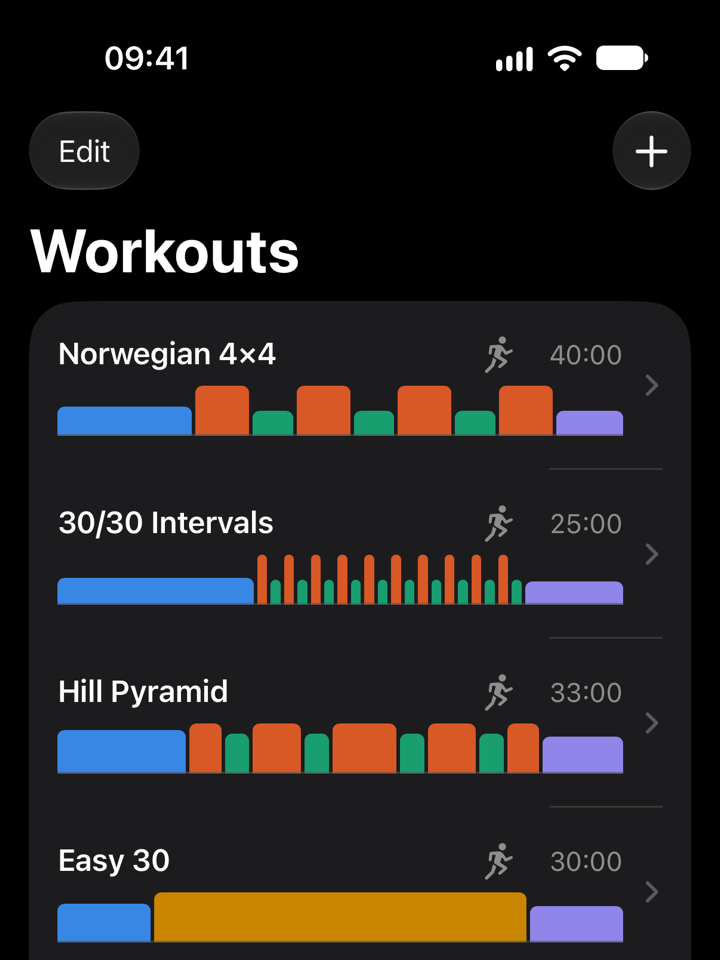
Your workouts, drawn to scale
Each bar is a step. Its width is the time and its height is the speed.
Run
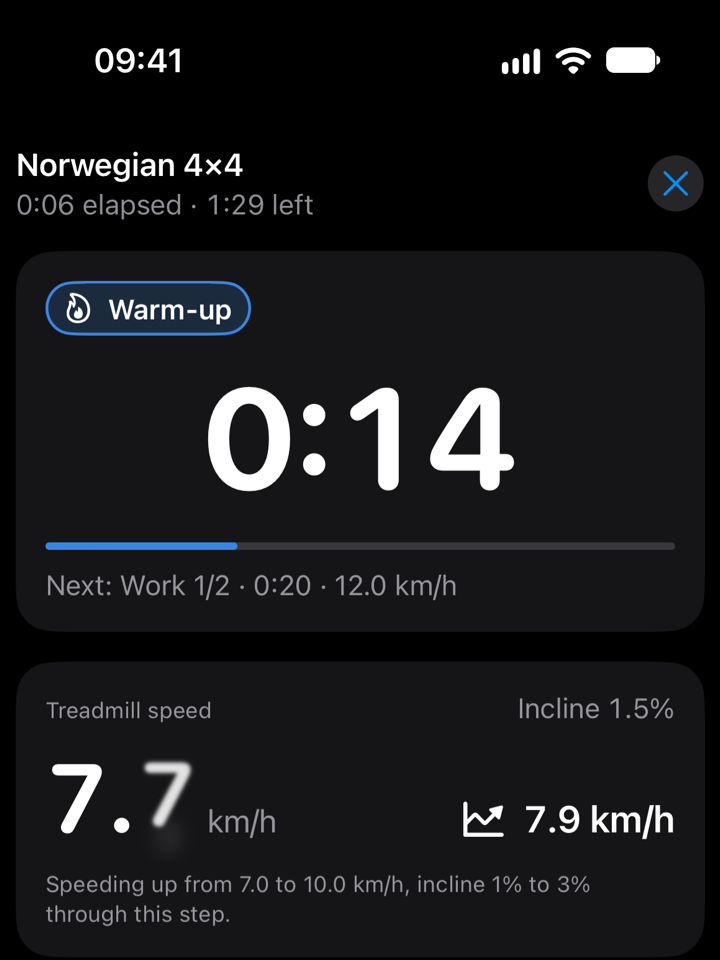
Speed and incline change on their own
A step can hold its speed or change it gradually, like this warm-up from 7 to 10 km/h.
Review
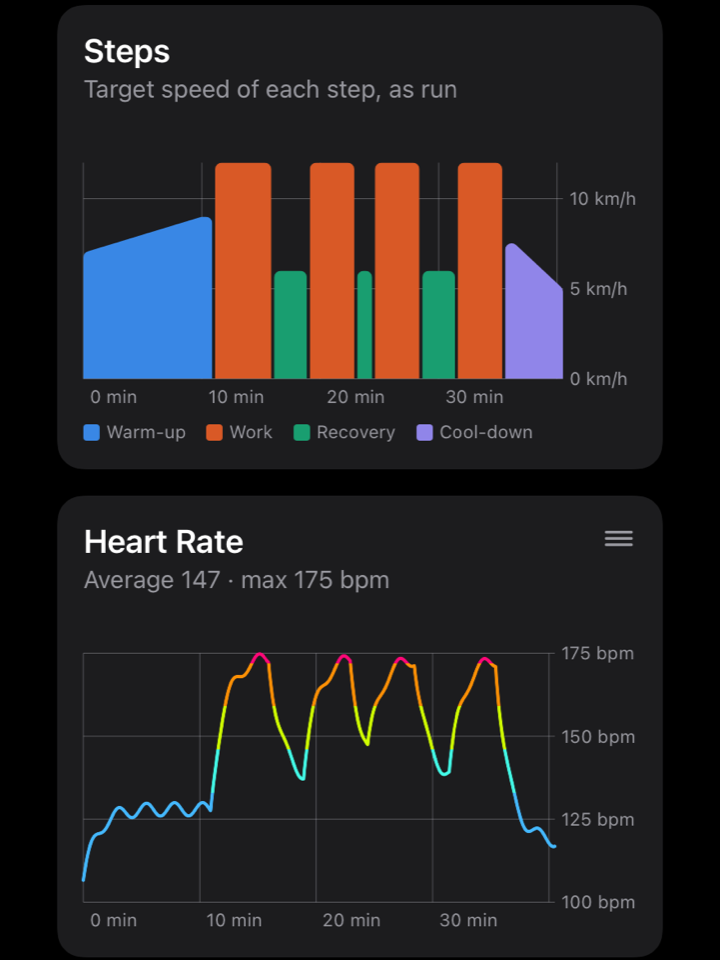
Every step against your heart rate
Charts, time in each zone, intervals and splits after every workout.
Features
Everything an interval session needs
Built for intervals
- Warm-up, work, recovery and cool-down steps, with repeats like 4 × (4 min hard, 3 min easy)
- Steady speed and incline, or a gradual change: a progression from 8 to 12 km/h, or a climb from 1 to 6 %
- Templates for Norwegian 4×4, 30/30 Intervals, Hill Pyramid and Easy 30
- Runs or walks, steep incline walks included
Your treadmill on autopilot
On a treadmill that supports Bluetooth FTMS, the app changes speed and incline as each step begins. Change them on the console and the app keeps your setting for the rest of the step. Stop the belt and the workout pauses. No Bluetooth? Manual mode tells you what to set and when.
Heart rate from Apple Watch
The watch app opens on its own when the workout starts. Heart rate and zones show on your iPhone, your watch and the Lock Screen. Zones come from your Health settings or your heart rate reserve, or you can set them by hand.
Cues you can hear and feel
Spoken cues and a 3-2-1 countdown at every step, a tap on the wrist as each one begins, and a Live Activity with pause and skip buttons. Extend or skip any step mid-workout, from your iPhone or your wrist.
Saved to Health
Workouts are saved as an Indoor Run or Indoor Walk, with each step as an interval, splits for every kilometre or mile, elevation, and heart rate and energy from Apple Watch. They show up in Fitness with your other workouts. Distance comes from the treadmill's belt unless you choose the watch's.
A summary after every workout
Heart rate, speed, cadence and elevation charts lined up with your steps, time in each zone, a row per interval, splits, running form, and the treadmill's distance next to the watch's. Every finished workout stays in History.
Support
Help with FTMS Treadmill
Answers to common questions.
Treadmills
Which treadmills work?
Treadmills that support Bluetooth FTMS (Fitness Machine Service), the standard many recent treadmills use to work with fitness apps. Look for “FTMS” or “Bluetooth Fitness Machine” in the manual or the specs.
If your treadmill only works with its maker's own app, it probably uses a private protocol and won't connect. You can still use manual mode in the Treadmill tab: the app tells you what speed and incline to set, and when.
My treadmill doesn't show up
Check that:
- the treadmill is on and its Bluetooth is enabled (some need a button press first);
- it isn't connected to another app, phone or tablet, since most treadmills accept one connection at a time;
- FTMS Treadmill is allowed to use Bluetooth in Settings › Privacy & Security › Bluetooth.
Then open the Treadmill tab again.
Can the app start the belt on its own?
No. The belt only starts when you tap Start or Resume, and the app only changes the speed while the belt is moving. The treadmill's stop button and safety key always work, and stopping the belt pauses the workout. Keep the safety key clipped on as usual.
I changed the speed on the console. What happens?
The app keeps your setting for the rest of that step and goes back to the plan when the next step begins. The same goes for incline.
The app closed during a workout
Open it again. It picks up where the workout should be and reconnects to the treadmill. If the belt stopped in the meantime, the workout stays paused until you tap Resume.
Apple Watch and heart rate
How do I see my heart rate?
Install FTMS Treadmill on your Apple Watch (in the Watch app on your iPhone, look under Available Apps), then turn on Track with Apple Watch on the workout's start screen. The watch app opens on its own when the workout starts.
Track with Apple Watch is greyed out
The app isn't installed on a paired Apple Watch. The reason is shown below the switch.
Why does it say heart rate isn't shown?
With both Save to Health and Track with Apple Watch off, the app expects you to record the workout with Apple's Workout app. Apple Watch runs one workout at a time, so it can't stream heart rate to this app as well.
Where do my heart rate zones come from?
From your Health settings by default, the same zones Apple's Workout app uses. In Settings › Heart Rate Zones you can calculate them from your heart rate reserve instead, or enter them by hand. Past workouts keep the zones they were run with.
Health and Fitness
Where are my workouts saved?
With Save to Health on, in the Health app as an Indoor Run or Indoor Walk, so they also appear in Fitness. Each step is saved as an interval, with splits for every kilometre or mile.
Every finished workout is also kept in the app's History tab. Deleting one there doesn't remove it from Health.
Why do the treadmill and watch distances differ?
Apple Watch estimates distance from your movement, which is harder on a treadmill, especially when you hold the handrails. By default the app saves the treadmill's belt distance to Health. To save the watch's instead, change Distance in Health on the workout's start screen. The summary shows both.
Should I choose Run or Walk?
Choose it when you edit a workout. Pick Walk for walks, steep incline walks included: they're saved as Indoor Walks, and Apple Watch tunes its energy estimate to the activity.
Can I record with Apple's Workout app instead?
Yes. Turn off Save to Health and Track with Apple Watch, and the app gives you a countdown to start an Indoor Run or Indoor Walk in the Workout app at the same time. It still drives the treadmill.
Using the app
How do I change units or cues?
In Settings: Units switches between km/h and mph, or shows pace instead of speed. Cues turns spoken cues, the 3-2-1 countdown and haptics on Apple Watch on or off.
Do I need an account or an internet connection?
No. There's no account, and the app works offline. Your workouts stay on your devices and in Health. See the privacy policy.